

Purchase orders via mailbox
Connect a mailbox and purchase orders with PDF attachments arrive in the import automatically.
Instead of uploading PDFs by hand, connect the mailbox where purchase orders arrive under Import & Export → Mailboxes.
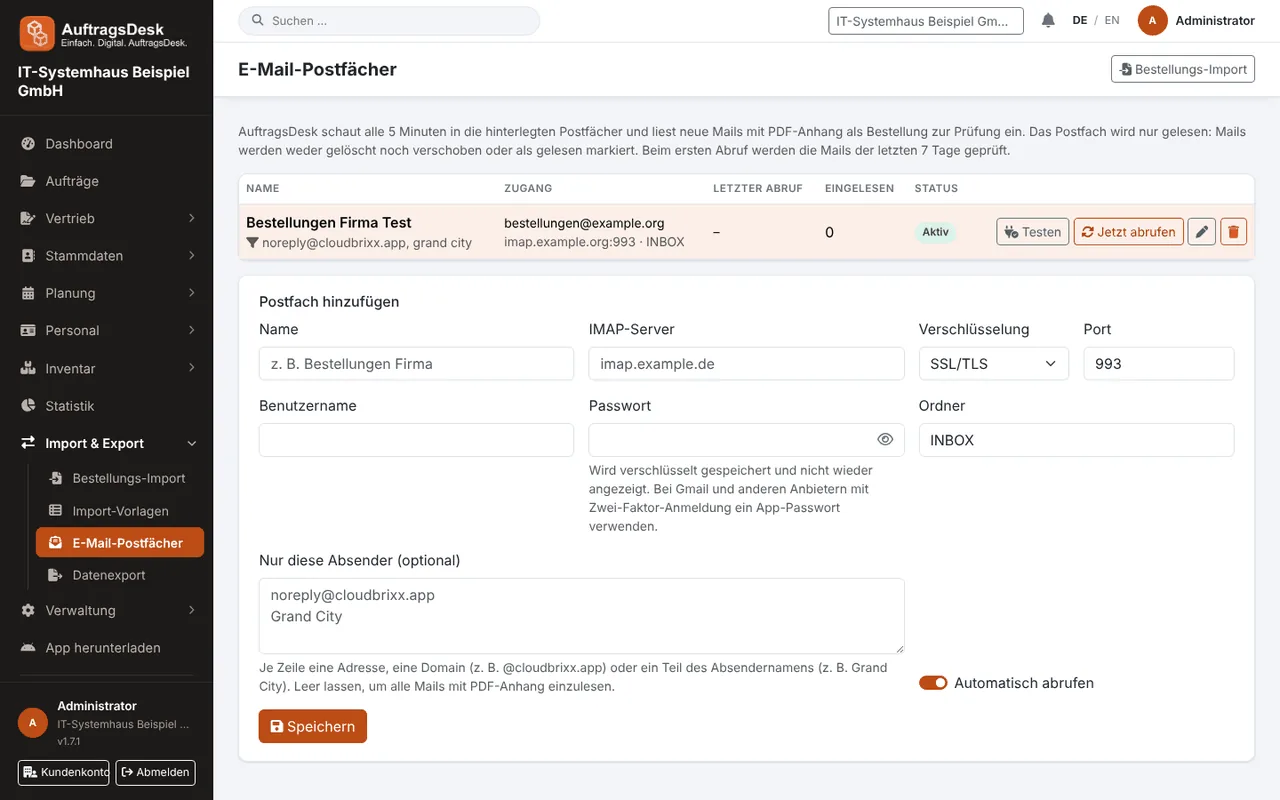
Connecting a mailbox
- IMAP with server, port (993 with SSL/TLS or 143 with STARTTLS), user and password. The password is stored encrypted and never shown again.
- Microsoft 365 or Gmail / Google Workspace via the sign-in connected under Integrations, without a password.
Choose the folder, click Test and save.
What happens next
Every 5 minutes AuftragsDesk checks for new e-mails with PDF attachments (also in forwarded e-mails) and creates them as purchase orders for review, with sender, subject and time received. The mailbox is read only: nothing is deleted, moved or marked as read. The first run checks the last 7 days.
Everyone with the permission "Order import" is notified about each new purchase order.
Filtering senders
- Only certain senders: address, domain or part of the sender name.
- Ignore these senders: e.g. invoices from delivery services or newsletters with PDFs. The block list takes precedence.
Optionally, e-mails without a PDF are read in as enquiries with the e-mail text.