

Connecting file storage and e-mail
Store photos and reports automatically in OneDrive, Google Drive or Dropbox and send mails from your own address.
File storage: OneDrive, Google Drive, Dropbox
Once connected, AuftragsDesk stores files automatically in your cloud storage. On the integration's detail page you define under What goes where?:
- Main folder, default "AuftragsDesk" (subfolders with
/) - Folder structure: "customer, then order" (default), "year, month, then order" or "order only"
- Which files: photos from work reports (split into "photos before" and "photos after"), documents on the order, customer and/or internal report as PDF once the order is completed
An example:
AuftragsDesk/Miller Ltd/A-2026-0142/Fotos vorher/20261021-090000_IMG_2041.jpg
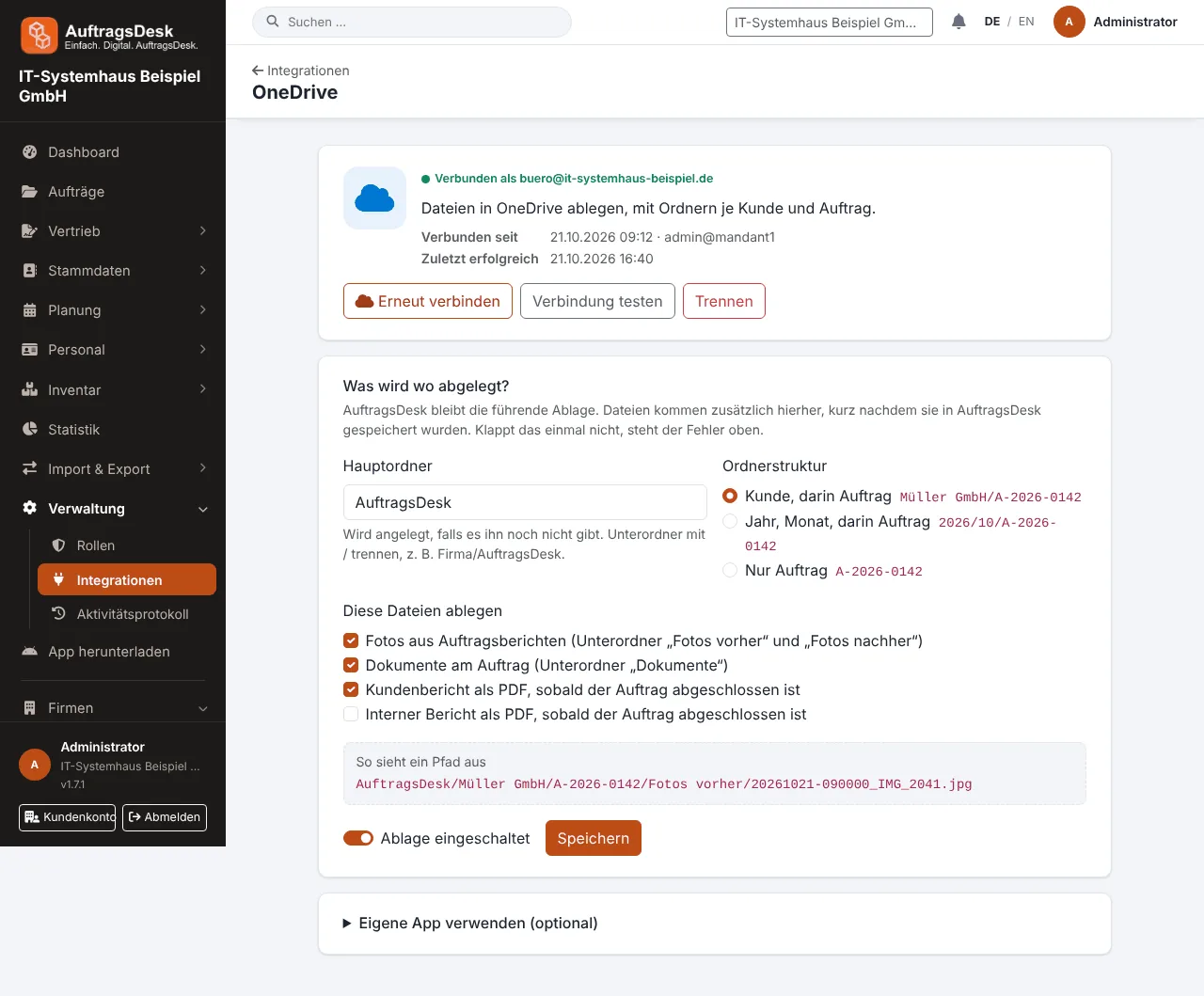
Storage can be paused at any time. Google Drive only sees the folders and files AuftragsDesk created itself.
Own mail server (SMTP): enter host, port and credentials. Mails to customers, such as quotes, reports and portal invitations, are then sent from your own address. Without SMTP, AuftragsDesk uses the system e-mail.
Microsoft 365 and Gmail: connect a mailbox with one click to fetch orders automatically. See E-mail mailboxes.
After setup, test the connection on the detail page. Storage or sending errors are listed there with a timestamp.