

Editing several orders at once
Select orders in the list and change status, appointment, assignment or note together, or export them.
In the order overview you select orders with the checkbox at the start of each row. The checkbox in the table header selects all orders on the current page. Shift + click selects all rows between two clicks, Esc clears the selection.
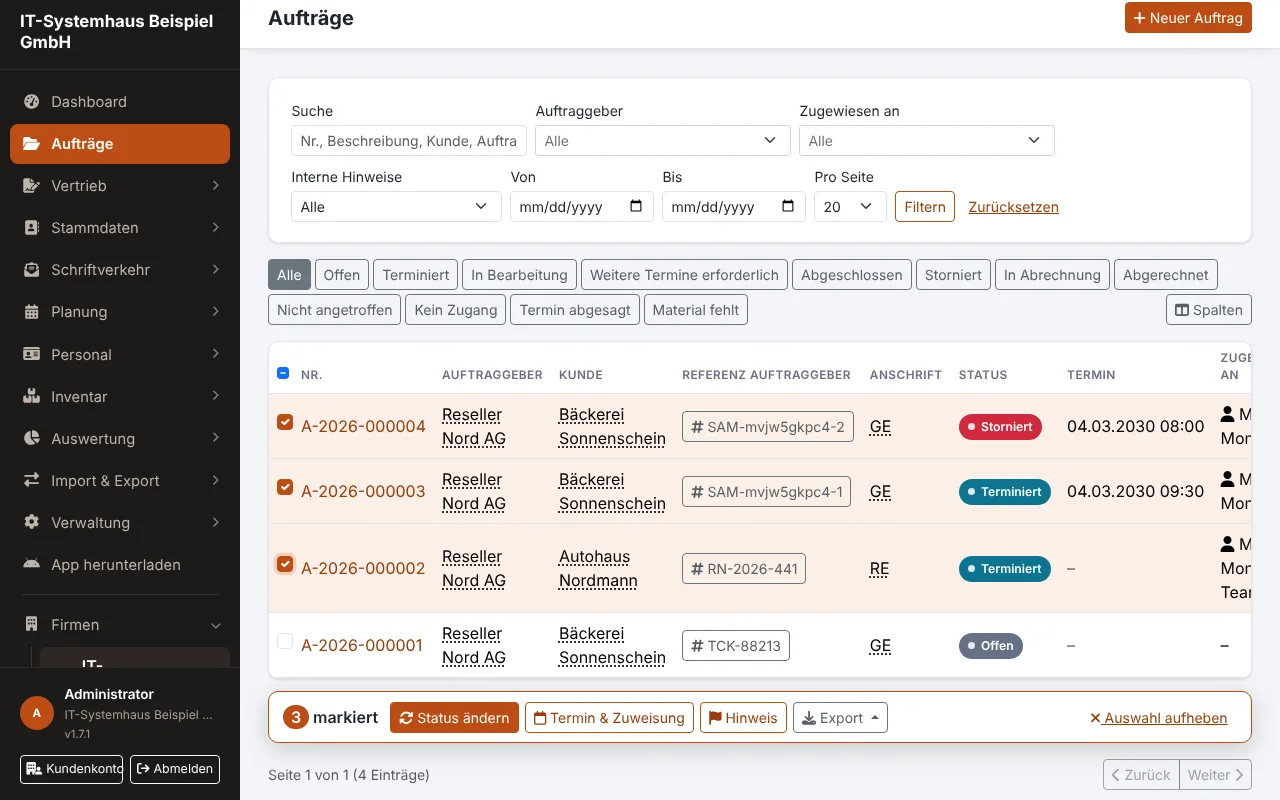
As soon as something is selected, the action bar appears at the bottom with the count and these actions:
| Action | What happens | Permission |
|---|---|---|
| Change status | new status for all selected orders | Change order status |
| Appointment & assignment | common appointment, remove the appointment and/or assign an employee or team | Edit orders |
| Note | the same internal note on every order | as on a single order |
| Export | list as CSV for Excel or the order summaries as one PDF (up to 50 orders) | View orders |
| Delete | permanently delete the selected orders, billed ones are skipped (more) | Delete orders and order reports |
The same rules apply as on a single order. Orders where an action is not possible are skipped; afterwards a box above the list shows which ones and why, for example "transition not allowed" or "before photo missing".
Appointments for a route
Under Appointment & assignment choose "New appointment" and a gap per order. The first selected order gets the time you entered, each further one a time later by the gap, in list order. With the assignment switched on, all orders go to the same employee or team. Open orders become "Scheduled", just like when editing a single order.
Filter the list first, e.g. by status "Open" or a client, and set "Per page" to 100. Then one click in the table header selects all matching orders.
Users without "View all orders" can only change their own and their team's orders through the selection too. A bulk note to a role creates just one notification per recipient.
In other lists
The checkboxes and action bar work the same way in these lists:
| List | Bulk actions | Permission |
|---|---|---|
| Absences → "To approve" | Approve, Reject (one reason for all) | Manage absences |
| Notifications | Mark as read, mark as unread | own notifications |
| Quotes | Withdraw (open ones only), export as CSV | Manage quotes |
| Maintenance contracts | Create next order, Activate, Pause, End | Maintenance contracts |
| Users | Activate, Deactivate | Manage users |
| Customers | Export as CSV, switch customer portal access on or off | Manage customers |
| Order import | Reject (open orders only) | Order import |
| Appointment booking → open requests | Confirm as proposed, Reject | Appointment booking |
As with orders, each entry gets the same check as the single action. Entries that are already done, such as an absence that was already approved or a request whose time is now taken, are skipped and listed with the reason. Your own user account is never deactivated. Employees and customers get the same messages as for a single decision.