

Customer account, subscription and payment
Manage companies and licences, invoices, balance and payment method, change plan or cancel.
The customer account belongs to the holder of your AuftragsDesk contract. One customer account can have several companies, each with its own licence. You open it via Customer account in the sidebar. The customer account is an area of its own: the sidebar then shows only its pages, and Back to … at the top takes you back to your company.
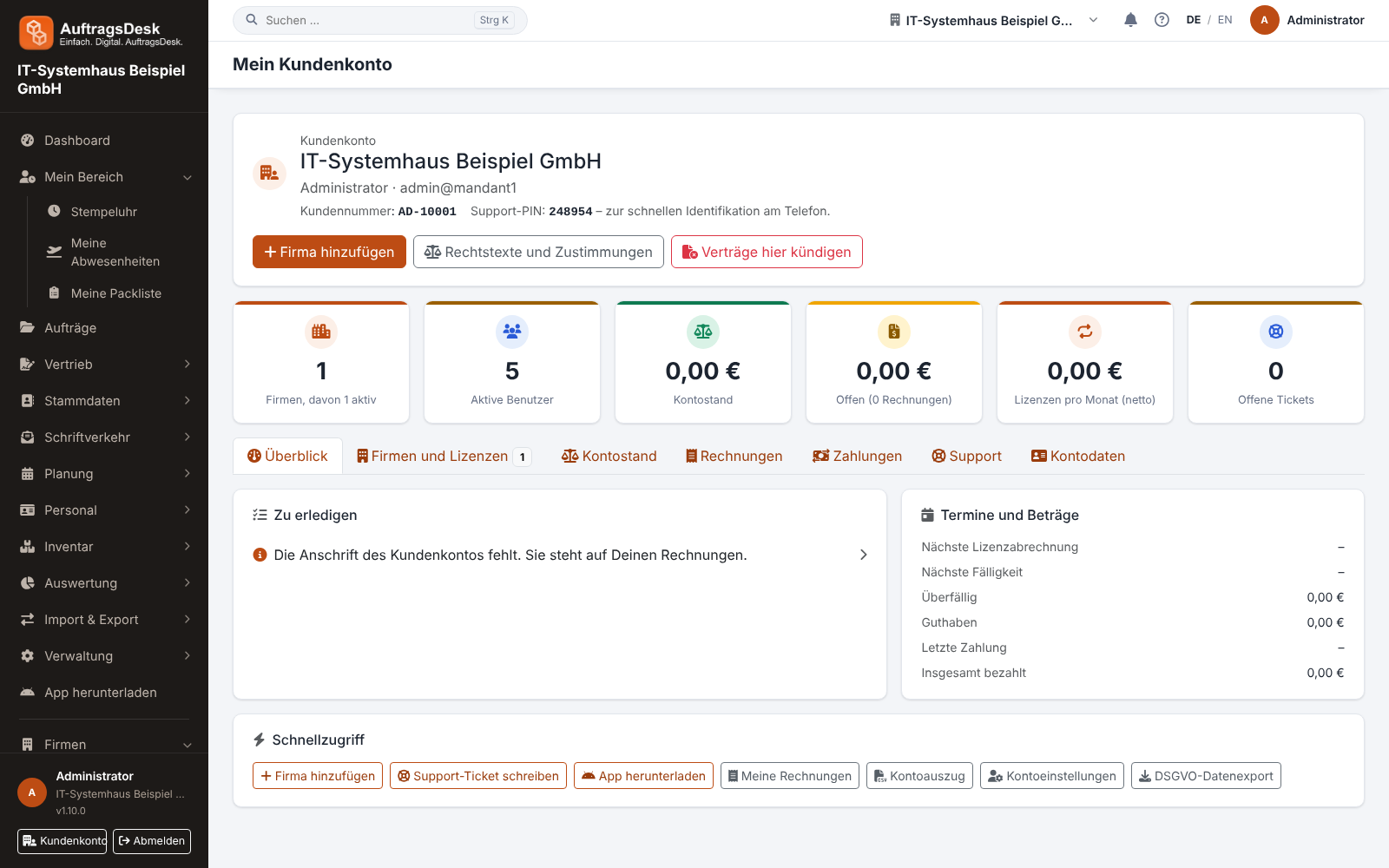
The pages of the customer account
| Page | Content |
|---|---|
| Overview | key figures, "To do" (such as overdue invoices, ending trial or tickets awaiting your reply), upcoming dates; below it the tabs Companies and licences (plan, payment method, interval, next billing, number of users, trial, data processing agreement) and Balance (credit, open amounts, statement as CSV or PDF, optionally for a period) |
| Invoices and Payments | all invoices as PDF and all incoming payments |
| Support tickets | your support tickets |
| Account details | address, invoice details, data export, support PIN, password and two-factor |
| Legal terms and consents, Refer a company, Feature requests, Terminate contracts here | as named |
Further people, e.g. your bookkeeping
Under Account details → Further people you invite someone with first and last name and email address. The person receives an invitation email with a link valid for 72 hours (expired? Send a new one with Send link again), sets their own password and signs in with their email address. They only see the customer account's invoices (with the document as PDF) and payments; companies, subscription, account details and cancellation remain yours, and they cannot pay online. Remove blocks the access immediately.
Changing your email address
You change the contact email under Account details. So that nobody with a hijacked session can redirect your account to their address, we send a link to both the new and the previous address. The new address only takes effect once both are confirmed (within 48 hours). Until then, invoices and notices go to the previous address. If you no longer have access to the previous address, contact us via a support ticket. The same applies to the business email under My account and in the app.
Payment method
You pay by bank transfer, SEPA direct debit, credit card, PayPal or an online payment method. When you order, every enabled online payment method (e.g. iDEAL, Klarna, Apple Pay) is listed on its own with its logo; you pay the first invoice with it right away. Under Subscription and payment you set a default payment method. You can switch a running subscription yourself; the current period is not charged again.
Payment deadline for an order
If you order by bank transfer or pay the invoice online, the first invoice is due 3 working days after the invoice date (Monday to Friday). The date is shown on the invoice, in the e-mail and on the bank transfer page. If no payment arrives by then, the order is cancelled automatically on the next working day and you receive an e-mail. You then owe nothing and can place a new order at any time. The company stays as it was before the order. A transfer that only arrives after the cancellation is credited to your balance and used for the next invoice.
Your invoices
We create invoices and cancellations in our accounting software (e.g. Lexware Office). The PDF under Invoices and attached to the e-mail is exactly that document, with its invoice number. Use this number as the payment reference for a bank transfer. If an invoice is cancelled, a credit note for it is created there. Older invoices remain available unchanged. If a document cannot be retrieved right now, you see a notice instead of the PDF. Please try again a little later.
Open invoices and reminders
Invoices of a running subscription are never cancelled. If an invoice is overdue, you first receive a payment reminder, then reminders. The final reminder announces a block. If the invoice is still open after that, the company is set to read-only: you can sign in and view everything but cannot change anything. As soon as the invoice is paid, the block is lifted automatically. Credit on your account is always used first.
Changing plan
Use Change licence to choose another plan. What each plan includes is listed under Plans and features. All prices are per company and month. If the new plan costs more, confirm the surcharge for the rest of the period with Change plan with obligation to pay; a cheaper plan applies immediately with Change now. If you have a voucher code, enter it in the same form: it is checked as you type, Calculate difference then uses the discounted price, and it replaces the current discount of your subscription. Each code works once per company. Without a subscription (e.g. during the trial), you redeem the code when you take out the subscription.
Trial
New companies start with a free trial. Its length is shown under Companies and licences. When it is about to end, the overview shows a notice. Choose a payment method in time so there is no interruption. You take out the subscription with the Order with obligation to pay button. If you pay by bank transfer, the subscription starts on the day you order; if you ordered shortly before the end and the transfer is still on its way, the company stays usable until the payment arrives (at most until the payment deadline). If the trial ends without an order, this counts as the end of the contract (see below).
Cancelling
You cancel per company in the customer account or at any time via the Cancel contracts here button in the website footer, without signing in. You receive a confirmation by e-mail immediately. The company remains usable until the end of the paid period.
Failed payment
If a card, direct debit or PayPal payment fails, the subscription shows Payment failed. Set up a working payment method under Change payment method; this also works while the company is blocked. If payment keeps failing for 14 days, the company can be set to read-only. As soon as payment succeeds again, the block is lifted automatically.
After the contract ends
The contract ends when the trial expires without an order, when a cancelled subscription reaches the end of the paid period, or when AuftragsDesk terminates it. Then:
| Period | What happens |
|---|---|
| From the day after the end of the contract, for 30 days | Your employees can no longer sign in. As the owner you open the company in the customer account with View: you see everything and can download all data as a ZIP under Data export, but you can no longer change anything. |
| 7 days before the end and on the last day | You receive an e-mail with the deletion date. |
| After that | The company's data is deleted: orders, customers, reports, files and photos, employee accounts. Invoices are kept because of the statutory retention period. |
Until the deletion you can continue at any time with Take out a subscription now; the company is unlocked as soon as you pay and all data is still there. If invoices are still open, pay them first. After the deletion you can create a new company if needed.