

AuftragsDesk at a glance
What AuftragsDesk is, who it is for and how office, field team and customers work together.
AuftragsDesk is order management software for service companies and trades businesses with field staff. From the incoming order to planning, the job itself, the report and the invoice, everything runs in one system. The office works in the browser, technicians use the Android app, and customers can use the customer portal.
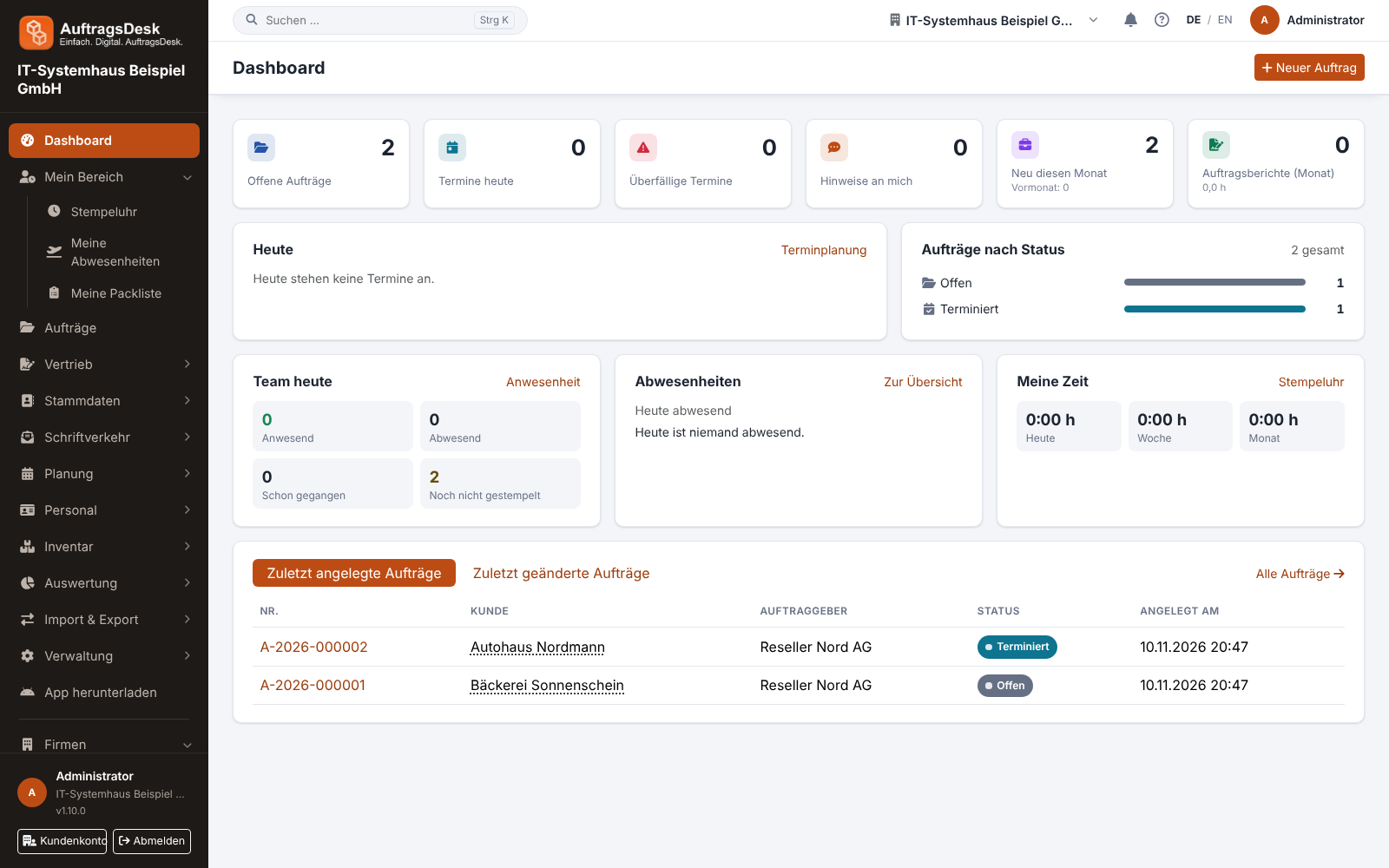
The dashboard
After signing in you see the dashboard with the essentials at a glance. Every figure and row is a link; filtering happens in the order list.
- Key figures: open orders, appointments today, overdue appointments, open notes for you, new orders this month (with last month) and job reports this month with hours. A click opens the order list with the matching filter, for example Status: All open, Appointment: Today, Appointment: Overdue or Order report: Report this month. The list counts exactly like the tile; "Reset" shows all orders again.
- Today: today's appointments with their time, and overdue appointments below.
- Orders by status: only statuses that currently have orders; a click opens the order list with that status.
- Team today, Absences and My time: who is clocked in, absent or not yet clocked in, open leave requests and your own hours. "Open requests" and "Absent today" open the absences already filtered. You only see these cards with the matching permissions.
- Recently created and modified orders: the latest six; "All orders" opens the full list.
Without the permission "View all orders" only your own orders and those of your teams are counted.
While a page or data is loading, a thin orange loading bar runs along the top edge. It disappears on its own once everything has loaded.
Who uses what?
| Who | With | Typical tasks |
|---|---|---|
| Office, dispatch | Browser | Create and plan orders, duty roster, quotes, billing |
| Field team | Android app | Work through jobs, photos, report and signature, time clock |
| Customers | Customer portal | Order status, reports, accept quotes, book appointments |
| Management | Browser | Reports, job costing, HR, customer account |
The life of an order
- Intake: The order is created by hand, imported from a PDF purchase order, arrives as a damage report from the customer portal or is created automatically from a maintenance contract.
- Planning: Set date and technician in scheduling or the duty roster.
- On site: The technician sees the job in the app immediately, navigates there, clocks in and takes "before" photos.
- Report: Work done, hours, materials, "after" photos and the customer's signature end up in the job report as a PDF.
- Billing: The order becomes a draft invoice in sevDesk, Lexware Office or orgaMAX.
Language
AuftragsDesk is available in German and English. On your first visit the language follows your browser: if it is set to English you see the English interface, for German and all other languages the German one. Use DE or EN in the top bar (on the website with Deutsch or English in the footer) to switch yourself; your browser remembers this choice, even after signing out. When you are signed in it applies to your account: after signing in on another device AuftragsDesk appears in your language straight away, and emails to you (password reset, email confirmation, security notices) are sent in it. If you have never chosen, your first sign-in takes the language of your browser.
Several companies, one account
A customer account can hold several companies (tenants), for example two branches or two legal entities. Their data is strictly separated; you switch company in the top bar.
The question mark at the top right of the application always opens the guide for the page you are on.
Which features each plan includes is described in Plans and features.